
Computer Science Project Ideas for High School Students


The strongest computer science projects for high school students combine programming skills with problem-solving, purpose, curiosity, documentation, and a clear outcome that can become a meaningful part of a student’s portfolio.
Key Takeaways
- A successful computer science project starts with the right scope: beginners should focus on completing a small working version before adding advanced features.
- Computer science projects can range from coding projects and applications to independent research projects involving experiments, datasets, and published findings.
- Students should choose projects based on their current skill level: beginner projects build programming foundations, while advanced projects explore AI, machine learning, cybersecurity, and research.
- A well-documented project with a GitHub repository, README file, and demo video can become a strong college application portfolio asset.
- Project-based learning develops computational thinking, debugging ability, logical reasoning, and real-world problem-solving skills.
- Competitions such as USACO, CyberPatriot, Congressional App Challenge, and FIRST Robotics allow students to showcase their technical work.
Quick Start: Pick Your Computer Science Research Project in 3 Steps
- Choose a project category: Decide whether you are most interested in software development, artificial intelligence, cybersecurity, robotics, data science, games, or research.
- Match the project to your current skills: A beginner learning Python should not immediately attempt to build a complex AI model. Start with a smaller project, then increase complexity.
- Define your final deliverable: Decide what you will produce: a working application, website, research paper, GitHub portfolio, competition submission, or presentation.
How to Choose a Computer Science Project That Matches Your Skill Level
One of the biggest challenges students face is choosing a project that is interesting but realistic. A project that is too simple may not demonstrate growth, while a project that is too advanced can become overwhelming. The goal is to find a challenge that pushes your skills without preventing you from finishing.
A useful way to think about computer science project ideas is as a progression:
- Beginner: Learning programming concepts and creating small working programs
- Intermediate: Combining multiple technologies into complete applications
- Advanced: Developing systems, machine learning models, or research projects
The table below shows how project complexity typically increases:
Coding Project vs. Research Project: What Is the Difference?
Students often use the terms “coding project” and “computer science research project” interchangeably, but they have different goals. A coding project focuses on building a functional product, while a research project focuses on answering a question through experimentation and analysis.
A student building a chatbot is completing a coding project. A student comparing different chatbot models and measuring accuracy, bias, or user satisfaction is moving toward research.
The MVP Approach: How to Finish Instead of Abandoning a Project
A common mistake in computer science is trying to build a complete version immediately. Professional developers often use an MVP (minimum viable product) approach, which means creating the smallest working version first.
For example:
Large idea: Build a social media platform.
MVP version:
- Create user profiles
- Allow users to make simple posts
- Store information in a database
After the first version works, additional features can be added. This approach helps students develop project scope management skills and creates a finished product they can improve.
Beginner Computer Science Project Ideas for High School Students
Beginner projects are designed to teach programming foundations such as variables, loops, conditionals, debugging, and logical reasoning. You do not need advanced mathematics or previous computer science experience to start. The most important goal is building confidence by completing a working project.
Many students begin with Python because of its readable syntax, while others start with HTML, CSS, JavaScript, or visual programming platforms such as Scratch.
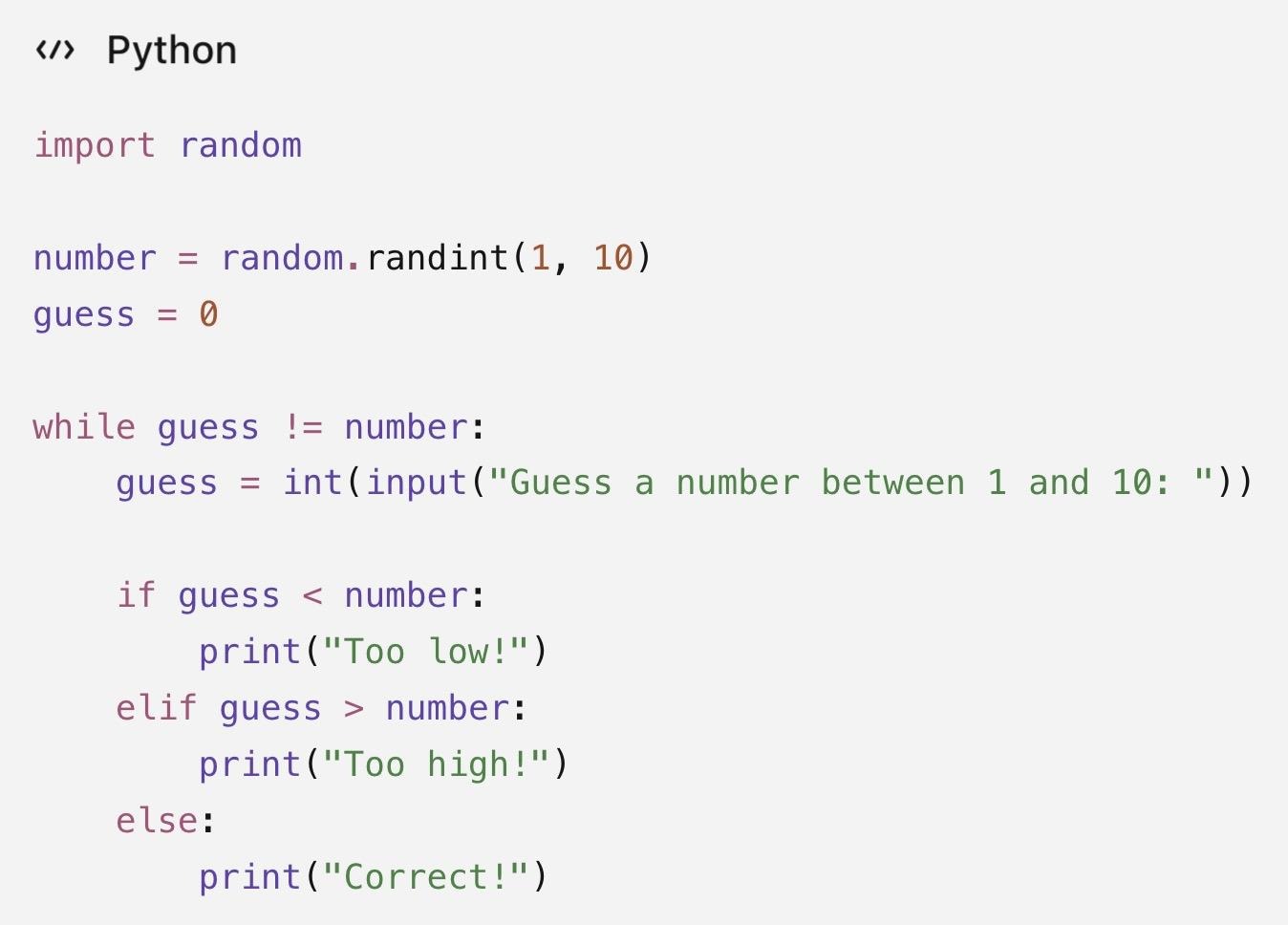
- Number Guessing Game: A number guessing game teaches basic programming logic by having the computer generate a random number while the user attempts to guess it through repeated attempts.
- Tools: Python Approximate scope: 50–80 lines of code
- Extension: Once the basic game works, add difficulty levels, attempt tracking, or a high-score system saved to a file
- Personal Portfolio Website: A personal website project introduces students to web development by allowing them to create an online portfolio showcasing their interests, projects, and achievements.
- Tools: HTML, CSS, JavaScript, GitHub Pages Approximate scope: 1–3 pages of code
- Extension: Add project pages, embedded demo videos, or interactive JavaScript features to turn the website into a growing portfolio
- Text-Based Adventure Game: A text-based game teaches logical reasoning by requiring the program to respond to user choices using conditions, functions, and different possible outcomes.
- Tools: Python Approximate scope: 50–100 lines of code
- Extend it: Add an inventory system, character statistics, multiple endings, or saved game progress
- Interactive Quiz App: A quiz app helps students practice storing information and creating programs that respond to user actions.
- Tools: JavaScript or Python Approximate scope: 50–150 lines of code
- Extension: Add categories, difficulty levels, timers, or a leaderboard to make the project more interactive
- Digital Animation Project: A digital animation project is an accessible first programming experience where students use events, movement, and logic to create interactive visuals.
- Tools: Scratch Approximate scope: Basic project with multiple sprites and events
- Extension: Add user controls, interactive elements, or a story-based structure to transform an animation into a simple game
- Simple Calculator: A calculator project helps beginners understand how programs process user input and perform operations using functions.
- Tools: Python or JavaScript Approximate scope: 30–100 lines of code
- Extension: Add a graphical interface, calculation history, or advanced mathematical functions
- No-Code Mobile or Web App: Students who want to build an application before learning programming can use no-code platforms to explore software design and user experience.
- Tools: Thunkable or Bubble Approximate scope: Basic working prototype
- Extension: Add user accounts, additional screens, or real-world data connections through APIs
The example below shows the core logic behind a number guessing game: generating a random value, accepting user input, using conditional statements, and repeating actions with a loop. Even beginner projects introduce important computer science concepts such as debugging, logical reasoning, and problem-solving through programming.
Intermediate Coding Projects to Build a Real Portfolio
Intermediate projects are where students begin creating work that looks closer to professional software development. These projects usually combine multiple skills, such as programming, databases, user experience design, APIs, data analysis, and version control.
A strong intermediate project should not only work but also be documented. A GitHub repository with a clear README shows how you approached problems, tested solutions, improved your code, and communicated your technical decisions.
- Full-Stack Web Application: A full-stack web application combines a user-facing interface with backend systems that manage data and functionality. Students can build projects such as study planners, school event platforms, habit trackers, or volunteer matching websites.
- Tools: JavaScript, React.js, APIs, Git, GitHub Concrete deliverable: A working web application with documentation and a GitHub repository
- What the college admissions reader sees: A completed full-stack app demonstrates software engineering skills, API integration, problem-solving, and the ability to complete a long-term technical project
- Data Science and Data Analysis Project: A data analysis project uses real-world datasets to answer questions, identify patterns, and communicate findings. Students can find datasets through platforms such as Kaggle or the UCI Machine Learning Repository and analyze topics such as climate trends, sports statistics, or public data.
- Tools: Python, pandas, NumPy, Jupyter Notebook, Kaggle datasets Concrete deliverable: A research-style report with cleaned data, visualizations, and conclusions
- What the college admissions reader sees: A data science project shows the ability to work with complex information, perform data wrangling, and explain evidence-based conclusions
- Mobile App Development Project: Mobile app projects allow students to create software designed for real users. Projects might include educational tools, productivity apps, tracking systems, or solutions to everyday problems.
- Tools: Thunkable, Java, or React Native Concrete deliverable: A functional mobile app prototype or published application
- What the college admissions reader sees: A mobile app demonstrates product development skills, user-centered design, and the ability to turn an idea into a usable tool
- Natural Language Processing (NLP) Project: Natural language processing projects teach computers to analyze and understand human language. Students can explore projects such as sentiment analysis, text classification, chatbot experiments, or text summarization.
- Tools: Python, scikit-learn, pandas, Jupyter Notebook, Hugging Face (advanced) Concrete deliverable: A tested NLP model with evaluation results
- What the college admissions reader sees: An NLP project demonstrates machine learning experience, experimentation, and the ability to evaluate how well a model performs
- Data Visualization Dashboard: A data visualization project transforms complex information into interactive charts and dashboards that make patterns easier to understand.
- Tools: Python, JavaScript, visualization libraries, Jupyter Notebook Concrete deliverable: An interactive dashboard or online data report
- What the college admissions reader sees: A visualization project highlights communication skills and the ability to present technical information clearly to different audiences
- API-Based Application: An API-based application connects different software services or datasets to create a more powerful tool. Students might build projects such as weather applications, information dashboards, or tools that combine data from multiple sources.
- Tools: JavaScript, Python, APIs, Git, GitHub Concrete deliverable: A working application that uses external data sources
- What the college admissions reader sees: An API project demonstrates integration skills, debugging ability, and experience building software that interacts with real-world systems
Finding datasets:
Students can find publicly available datasets for analysis projects through platforms such as Kaggle and the UCI Machine Learning Repository. Kaggle allows students to search datasets by topic, read descriptions, explore sample data, and download files for use in Python projects with tools such as pandas, NumPy, and Jupyter Notebook. Starting with a well-documented dataset can make the first steps of a data science project much easier.
Advanced Computer Science Projects for High School Students
Advanced computer science projects allow students to move beyond simply building software and begin exploring how technology can solve complex problems. These projects often combine programming with mathematics, data analysis, experimentation, and research methods.
At this stage, the goal is not only to create a working product but also to explain the decisions behind it. A strong advanced project includes documentation, evaluation, testing, and a discussion of limitations.
- Image Classification and Computer Vision Project: An image classification project teaches a computer to recognize and categorize visual information. Students can build systems that identify objects, plant species, recyclable materials, or facial expressions through computer vision.
- Research question: Can an AI model accurately identify different categories of images, and does its performance change across different groups or types of data?
- Tools: Python, TensorFlow, PyTorch, OpenCV, Google Colab, Kaggle image datasets
- Deliverable: A trained image classification model with evaluation results, error analysis, and a written explanation of the approach
- Expected timeline: 8–12 weeks
- What the college admissions reader sees: A computer vision project demonstrates advanced programming skills, experimentation, data analysis, and the ability to evaluate how technology performs in real-world situations
- Deepfake Detection Model: A deepfake detection project explores how artificial intelligence can identify manipulated images or videos. Students investigate how computer vision systems recognize patterns that distinguish authentic and AI-generated media.
- Research question: How effectively can AI detect manipulated media, and what types of deepfakes are most difficult for models to identify?
- Tools: Python, OpenCV, TensorFlow, PyTorch, machine learning models, public datasets such as FaceForensics++
- Deliverable: A detection model with accuracy results, examples of incorrect predictions, and an analysis of model limitations
- Expected timeline: 10–16 weeks
- What the college admissions reader sees: A deepfake detection project shows interest in emerging technology, ethical applications of AI, and research-based problem solving
- Reinforcement Learning Agent: A reinforcement learning project teaches an AI system to make decisions through trial and error. Instead of learning from labeled examples, the system improves by receiving rewards or penalties.
- Research question: Can an AI agent learn effective strategies in a simulated environment?
- Tools: Python, Gymnasium reinforcement learning environments, machine learning libraries
- Deliverable: A trained AI agent that completes a task, along with analysis of different learning strategies
- Expected timeline: 10–16 weeks
- What the college admissions reader sees: A reinforcement learning project demonstrates algorithmic thinking, experimentation, and the ability to work with complex computational systems
- Generative AI and Natural Language Processing Project: A generative AI project explores how models create, summarize, and analyze human language. Students can compare AI models, build language-based applications, or evaluate chatbot performance.
- Research question: How do different AI models produce different outputs, and what factors influence accuracy or quality?
- Tools: Python, Hugging Face, BERT-based language models, APIs, Google Colab
- Deliverable: A language model experiment, chatbot evaluation, or AI-powered application with documented results
- Expected timeline: 8–12 weeks
- What the college admissions reader sees: A generative AI project demonstrates understanding of modern AI tools, model evaluation, and responsible technology development
- Algorithm Optimization and Competitive Programming Project: An algorithm research project investigates how computational methods can be improved. Students can compare different algorithms for speed, efficiency, or resource usage.
- Research question: How can an algorithm be optimized to solve a problem faster or more efficiently?
- Tools: Python, C++, Java
- Deliverable: A research report comparing algorithm performance, efficiency, and possible improvements
- Expected timeline: 8–12 weeks
- What the college admissions reader sees: An algorithm project highlights computational thinking, logical reasoning, and strong programming fundamentals
Turning an Advanced Project Into Research
Advanced projects become stronger when students move beyond building a model and begin following a research process.
A research-quality workflow includes:
- Choose a research question Define what the project will investigate.
- Select data or an environment Use labeled datasets from Kaggle or Hugging Face, or simulation environments such as Gymnasium.
- Train and test the system Develop the model using appropriate tools and evaluate performance.
- Analyze accuracy and fairness Research-grade projects should examine errors and evaluate whether results differ across subgroups or categories.
- Document and present findings Students should create technical documentation, explain their methods, discuss limitations, and present conclusions.
Completed advanced projects can be submitted to opportunities such as Intel ISEF pathways, NeurIPS student tracks, and student research journals. Programs such as Algoverse show that high school research can reach professional audiences: the program reported that 230 high school students published research at NeurIPS 2025 through its mentorship program, with guidance from researchers from Meta FAIR, OpenAI, and Google DeepMind.
AI and Machine Learning Project Ideas for High School Students
Artificial intelligence (AI) and machine learning projects are among the most popular computer science research projects because they connect programming with real-world applications. Students can explore how computers learn from data, recognize patterns, process language, and make predictions.
AI projects vary widely in difficulty. A student creating a chatbot does not need the same background as someone training a deep learning model. The best project choice depends on a student's technical experience.
A useful way to choose an AI project is to match the project requirements with your current skills:
A strong AI research project requires more than simply running a model.
Students should include:
- A clearly defined problem
- A dataset
- A model or algorithm
- Testing and evaluation
- Analysis of limitations and possible improvements
For example, an image classifier should not only report accuracy. A stronger research project might investigate whether the model performs equally well across different categories, identify which images create the most errors, and suggest ways to improve performance.
Sentiment Analysis Project
Sentiment analysis is a natural language processing (NLP) project that teaches a computer to determine whether text expresses positive, negative, or neutral opinions.
- Sentiment Analysis with Machine Learning: Build a machine learning model that predicts the sentiment of text, such as product reviews, movie reviews, social media posts, public comments, and survey responses.
- Dataset Source: Kaggle, Twitter datasets, Reddit comment datasets
- Tools: Python, pandas, scikit-learn, Jupyter Notebook (Advanced: Hugging Face models and BERT-based language models)
- Evaluation: Measure model accuracy metrics using scikit-learn by comparing the model’s predictions against correct labels, assessing accuracy score, examples of correct and incorrect predictions, and discussion of why the model may have made mistakes
- Include in Your Write-Up: Why the dataset was selected, how the text data was cleaned, the machine learning method used, accuracy results, examples of incorrect predictions, and ideas for improving performance
A typical workflow includes:
- Finding a labeled dataset
- Cleaning and preparing the text data
- Converting words into numerical features
- Training a classification model
- Testing the model’s performance
- Analyzing errors and limitations
Image Classifier Project
An image classifier teaches a computer to recognize patterns in images. This type of project introduces students to computer vision and deep learning.
- Image Classification with Machine Learning: Train a model to identify categories such as: Animal species, Plants, Recyclable materials, Waste classification, Handwritten numbers, Plant diseases, emotion recognition, deepfake detection.
- Dataset Source: Kaggle datasets, UCI Machine Learning Repository datasets, standard benchmark image datasets
- Tools: TensorFlow, PyTorch, Google Colab, OpenCV
- Evaluation: Compare predictions against known labels using accuracy metrics, precision, error analysis, whether the model performs equally well across categories, which types of images create the most errors, and how changing the model affects performance
- Include in Your Write-Up: Dataset description, model architecture, training process, accuracy results, common mistakes made by the model, limitations, possible improvements
Students interested in research can compare different models and analyze which approach produces better results. Google Colab is especially useful because it removes the need for expensive hardware by allowing students to run machine learning models in the cloud.
Chatbot Project
Chatbots are one of the most accessible entry points into artificial intelligence because students can create useful applications without training a machine learning model from scratch.
- Chatbot: Create a chatbot that answers questions about a school club, a study topic, a local business, or a frequently asked question.
- Data Source: Dialogflow, IBM Watson
- Tools: Dialogflow, IBM Watson, Hugging Face models (advanced), BERT-based NLP models (advanced)
- Evaluation: Test if the chatbot answers common questions correctly, if it understands different ways users ask the same question, where the chatbot gives inaccurate responses, and how the user experience could be improved
- Extension: More advanced students can experiment with conversational datasets and pre-trained language models using Hugging Face, going beyond generating responses to analyze accuracy, usability, limitations, and possible improvements
- Include in Your Write-Up: The chatbot’s purpose, example conversations, design choices, challenges encountered, limitations, future improvements
Computer Vision Research Projects
Computer vision allows computers to interpret images and videos. Students can investigate how different models recognize and classify visual information. A research-focused project might compare multiple models and analyze which approach produces better results.
Possible research topics include:
- Waste classification using images
- Emotion recognition systems
- Plant disease identification
- Deepfake detection
Common tools include:
- Python
- OpenCV
- TensorFlow
- PyTorch
Reinforcement Learning Projects
Reinforcement learning focuses on teaching an AI system to make decisions through trial and error. Instead of receiving every correct answer, the system learns by receiving rewards for successful actions and penalties for incorrect decisions. Students can also explore reinforcement learning environments through platforms such as Gymnasium, which provides standardized environments for AI experiments.
Project ideas include:
- Training an AI agent to play a simple game
- Optimizing movement in a simulated environment
- Comparing different learning strategies
Training a Computer to Read Sentences
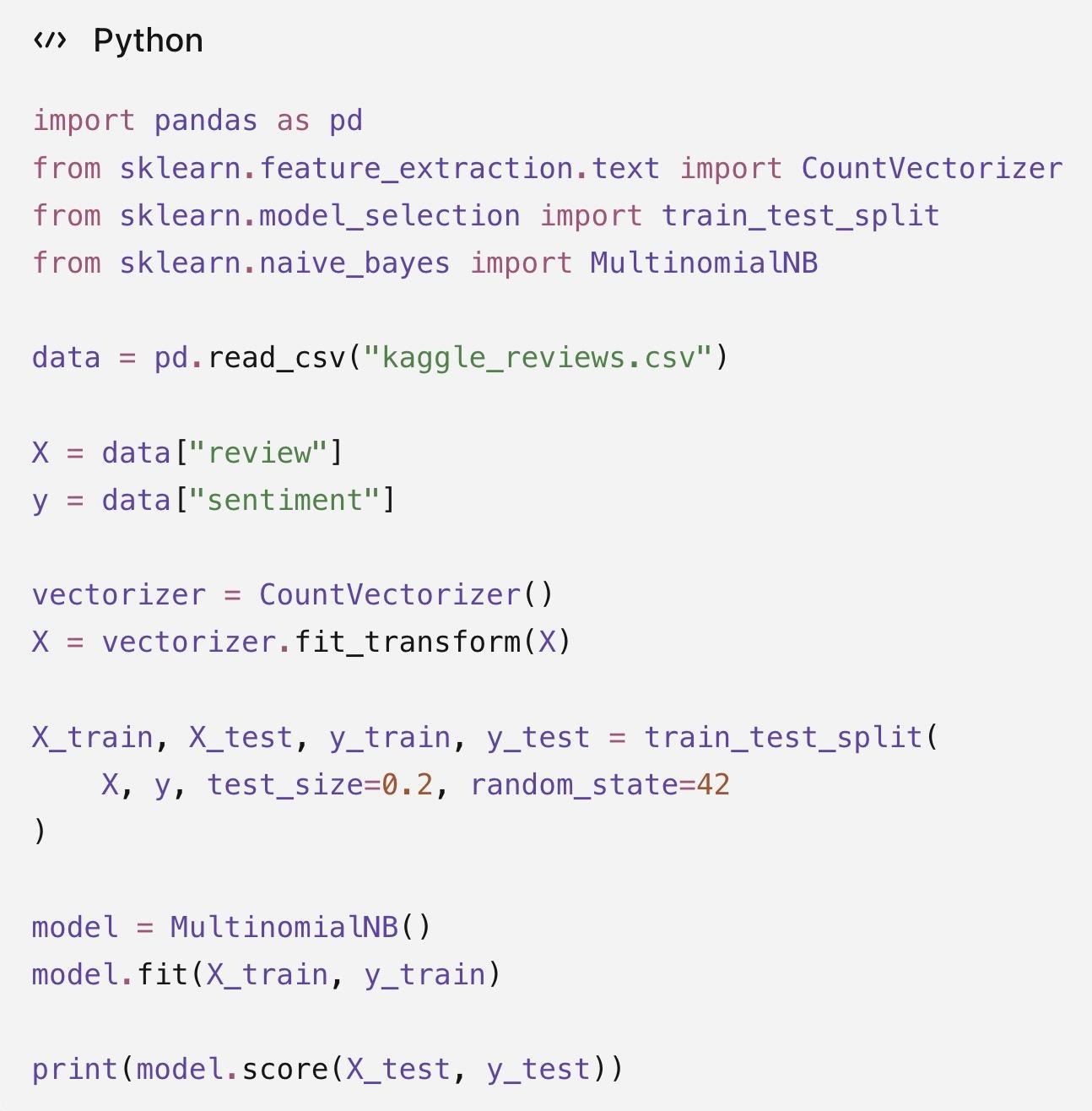
Imagine building an AI that can analyze thousands of online reviews and determine whether customers are happy or unhappy. The Python code below demonstrates sentiment analysis, a machine learning technique that teaches computers to recognize patterns in text.
The program first loads a dataset of reviews and converts words into numbers that a computer can understand. It then separates the data into training and testing groups, allowing the model to learn from examples and evaluate its accuracy on new reviews. Then a Naive Bayes algorithm identifies patterns between words and emotions, such as connecting words like "excellent" with positive feedback.
How the Code Works:
- Import libraries: Loads tools for handling data and building machine learning models.
- Load data: Reads a CSV file containing reviews and sentiment labels.
- Convert text to numbers: Uses CountVectorizer to transform words into numerical data.
- Train the model: Uses 80% of the data to learn patterns between words and sentiments.
- Test accuracy: Checks how well the model predicts sentiment on new reviews.
Example: Basic Sentiment Classifier in Python
This simplified example shows the basic workflow of a sentiment analysis project: loading text data, converting words into numerical features, training a model, and testing predictions.
Cybersecurity and Data Science Projects for High School Students
Cybersecurity and data science are two areas where students can create projects connected to real-world problems. Both fields emphasize analytical thinking, problem-solving, and careful investigation.
Cybersecurity projects should always be completed ethically using legal practice environments. Students should focus on learning how systems work, identifying weaknesses in controlled environments, and improving security.
Getting Started With Cybersecurity
Cybersecurity is a strong project area for students who enjoy solving puzzles, investigating systems, and understanding how technology works. A good starting point is completing beginner-friendly challenges before moving into larger competitions.
Cybersecurity Projects:
- Capture-the-Flag (CTF) Challenges: Complete a series of CTF challenges and document the security concepts learned, the problems solved, and the techniques used.
- Tools and resources: picoCTF, Python, Virtual practice environments
- Skills: CTF challenges teach students cybersecurity concepts through hands-on puzzles involving topics such as cryptography, web security, and system analysis. picoCTF is a beginner-friendly entry point, introducing cybersecurity concepts through student-friendly challenges. After developing foundational skills, students can explore competitions such as CyberPatriot
- Vulnerability Analysis Project: Analyze a simulated system, identify possible weaknesses, and create a report explaining how those vulnerabilities could be addressed.
- Tools and resources: Practice environments, virtual labs, security testing tools
- Skills: A vulnerability analysis project teaches students how security professionals identify weaknesses in controlled environments
- Password Security Study: Analyze password patterns using publicly available datasets and create recommendations for improving password security.
- Tools and resources: Python, Data analysis libraries
- Skills: A password security project combines cybersecurity with data analysis by investigating how password choices affect security
Cybersecurity Competition Pathway
Students who want to showcase cybersecurity skills can progress from beginner challenges into structured competitions.
Starting point:
- picoCTF: Beginner cybersecurity challenges
- CyberPatriot: Team-based cybersecurity competition
CyberPatriot allows teams of 2–6 students to practice securing systems and responding to cybersecurity challenges. This makes it accessible for students who want to participate without needing to develop advanced skills independently.
Cybersecurity projects can support future STEM pathways in areas such as:
- Information security
- Network engineering
- Digital forensics
- Cybersecurity research
Data Science Project Ideas
Data science projects combine programming, statistics, and communication. Students begin by selecting a dataset, cleaning and analyzing information, identifying patterns, creating visualizations, and explaining their findings.
Public datasets from platforms such as Kaggle, NOAA, and Data.gov allow students to investigate real-world questions without needing to collect large amounts of original data.
Data Science Projects:
- Weather Trend Analysis: Students can analyze climate patterns, temperature changes, or weather events using publicly available environmental data.
- Dataset source: NOAA datasets
- Tools: Python, pandas, NumPy, Jupyter Notebook
- Final project: A data analysis report with visualizations and conclusions about weather patterns
- Sports Statistics Analysis: Students can explore performance trends, compare players, or analyze team statistics.
- Dataset source: Kaggle datasets
- Tools: Python, pandas, Data visualization libraries
- Final project: An interactive dashboard or written analysis explaining patterns in sports data
- Public Health Data Analysis: Students can investigate trends in health-related information, such as disease patterns or population health statistics.
- Dataset source: Public datasets, Data.gov, Kaggle
- Tools: Python, pandas, NumPy, Jupyter Notebook
- Final project: A research-style report explaining findings through charts and analysis
- Transportation or Population Data Visualization: Students can use data visualization techniques to explain changes over time or compare different regions.
- Dataset source: Open government datasets, Kaggle
- Tools: Python, JavaScript, Visualization libraries
- Final project: An interactive visualization dashboard
Robotics, Hardware, and IoT Projects Using Arduino and Raspberry Pi
Robotics, Hardware, and IoT Projects Using Arduino and Raspberry Pi
Computer science projects can extend beyond software into robotics, electronics, and physical computing. Hardware projects require students to combine programming with engineering concepts, sensors, and real-world testing.
These projects are especially valuable because students must debug both code and physical systems. This process strengthens algorithmic thinking, problem-solving, and debugging skills while teaching students how software interacts with the physical world.
- LEGO Mindstorms Line-Following Robot: Create a robot that follows a path using sensors and simple programming logic.
- Skills: Provides a beginner-friendly introduction to robotics by allowing students to build and program robots without needing advanced electronics knowledge of algorithmic thinking, Programming logic, Sensor-based decision making, debugging, and testing
- Estimated cost: ~$100–$400 depending on kit availability
- Extension: Students can later transition from LEGO Mindstorms to Arduino-based robotics projects to gain more control over hardware components
- Arduino Sensor Monitoring Project: Build a device that uses an Arduino and sensors to collect and display real-world data, such as temperature, light levels, or motion changes.
- Skills: A common starting point for students interested in hardware because the platform allows beginners to connect code with physical components and practice concepts like programming fundamentals, electronics basics, data collection, and debugging hardware and code
- Estimated cost: ~$30–$50 for an Arduino Uno starter kit and basic components
- Extension: Students can use the Arduino IDE to write and upload programs that control sensors and electronic components
- Arduino IoT Smart Home Project: build a system that monitors room temperature, controls lighting, or tracks environmental conditions. An IoT smart home project combines programming, sensors, and internet-connected devices to automate everyday tasks.
- Skills: Internet of Things (IoT) development, data monitoring, hardware integration, problem-solving
- Estimated cost: ~$50–$150 depending on sensors and components
- Extension: A more advanced version can include wireless communication and mobile control features
- Raspberry Pi Computer Vision Project: create computer vision applications like object recognition systems, motion detection cameras, and recycling classification systems using cameras and tools such as OpenCV. Raspberry Pi projects allow students to build more advanced systems because the device provides greater computing power than a basic microcontroller.
- Skills: computer vision, Python programming, data processing, model testing and evaluation
- Estimated cost: ~$75–$150 for a Raspberry Pi kit with camera components
- Extension: A more advanced version can use a custom-trained machine learning model to recognize specific objects or classify images in real time
- Robotics Competition Project: Students interested in competitive robotics can apply their skills through programs such as FIRST Tech Challenge and FIRST Robotics Competition. These programs require teams to design, build, and program robots that complete specific challenges.
- Skills: Engineering design, programming, team collaboration, testing and iteration
- Estimated cost: Varies depending on equipment and team resources
- Extension: A more advanced version can incorporate autonomous navigation, computer vision, or AI-powered decision-making to improve the robot's performance
Students who are new to hardware projects can start with a simple Arduino setup using an Arduino Uno, a breadboard, jumper wires, and a basic sensor like a temperature or light sensor. The official Arduino Project Hub has beginner-friendly tutorials, example code, and project ideas that can help students build their first working device and add new features as they gain confidence.
Computer science is not limited to software. Robotics and hardware projects allow students to combine programming with electronics, engineering, and physical problem-solving. These projects are especially valuable because students must debug both code and real-world systems. This develops algorithmic thinking, patience, and testing skills.
How CS Projects Help With College Applications
A computer science project can strengthen a college application by showing curiosity, initiative, and the ability to solve real problems. Admissions readers are usually more interested in the process behind a project than just the final product.
For example:
“I created an app” is less meaningful than:
“I identified a problem, designed an app solution, tested it with users, improved the design, and documented the development process.”
Computer science is one of the most popular undergraduate fields, and universities such as Stanford have seen strong interest in CS majors. A well-developed project can help students demonstrate preparation for STEM pathways such as software engineering, data science, and cybersecurity.
What Admissions Readers Look For in a CS Project
A strong computer science project shows more than coding ability. It demonstrates problem-solving, persistence, and the ability to complete a long-term challenge.
Admissions readers often look for:
- A clear purpose: What problem does the project solve?
- Independent learning: Did the student go beyond classroom assignments?
- Technical growth: Did the student develop programming, debugging, or data skills?
- Iteration: Did the student test, improve, and refine the project?
- Communication: Can the student explain their decisions and results?
A completed project becomes much stronger when it is documented and shared. A GitHub repository, README, and demo video allow admissions readers to see how the student approached challenges and improved the final result. These experiences can complement independent projects by showing continued interest in the field.
Students can also build their CS background through:
- AP Computer Science Principles
- AP Computer Science A
- Community college computer science courses
- Internships
- Summer computer science programs
How to Present a CS Project in an Application
Students should focus on telling the story behind the project, not just listing the final outcome. Students completing research-focused computer science projects can also explore opportunities to share their work through student research journals such as NHSJS, Curieux Academic Journal, and Young Scientists Journal.
A strong project presentation includes:
- GitHub repository: Shows the code, development process, and version history
- README file: Explains the project goal, tools, challenges, and improvements
- Demo video or screenshots: Allows others to see the project in action
- Activity description: Explains the skills learned and impact created
- Competition or publication results: Shows external recognition when available
How Project Recognition Impacts College Applications
The level of achievement connected to a project can influence how admissions officers view the experience. The CollegeVine extracurricular tier framework provides one way to understand the difference between participation and high-impact accomplishments.
- Tier 3-4 activities: Participation in competitions, clubs, or local events, such as joining a hackathon or completing a regional challenge
- Tier 1-2 activities: Higher-impact achievements, such as winning a national competition, publishing research, or receiving major recognition for a project
For example, creating an app for the Congressional App Challenge or publishing an AI research project demonstrates a higher level of achievement than simply completing a private coding project. A strong CS project does not have to be groundbreaking. A well-documented project that shows growth, problem-solving, and sustained interest can become a valuable part of a student's college application and future STEM pathway.
Turning a Project Into a Portfolio Piece
A project becomes stronger when you show development over time.
Example pathway:
- Build a simple website
- Add interactive features
- Publish it online
- Collect feedback
- Improve the design
- Document the process
This demonstrates skills beyond coding, including communication, project management, and reflection.
Students can also strengthen their CS background through:
- AP Computer Science Principles
- AP Computer Science A
- community college computer science courses
- internships and summer programs
Competitions and Programs to Showcase Your Computer Science Projects
Competitions give students opportunities to test their skills, receive recognition, and compare their work with other students. The right competition depends on both interests and experience level.
Research and Mentorship Programs
Students who want to turn computer science projects into independent research experiences can also explore structured programs such as Polygence, Veritas AI, Inspirit AI, RISE Research, and Algoverse.
These programs typically provide mentorship, research guidance, and support for developing a final research paper or presentation. Some structured research pathways last around 8–10 weeks and can help students move from an idea to a completed independent research project.
How to Choose the Right Opportunity
The strongest match is usually the competition that aligns with your current project level:
- Beginner projects: Start with picoCTF, ACSL Junior, or introductory robotics programs.
- Intermediate projects: Consider CyberPatriot, Congressional App Challenge, ACSL Senior, or USACO Bronze/Silver.
- Advanced projects: Explore USACO Gold/Platinum, MIT Battlecode, Intel ISEF, or research publication opportunities.
Choosing a competition that matches your current skills allows you to build confidence, improve steadily, and create stronger computer science project ideas for future applications.
Indigo Research offers expert research and publication mentorship programs for high school students looking to create meaningful original work and strengthen their college applications.
FAQ
What is a good first computer science project for a high school student?
A good first project is small enough to finish but challenging enough to teach new skills. Examples include a Python game, personal website, calculator, or simple data analysis project.
Do I need to know programming before starting a CS project?
No. Beginners can start with Scratch, Code.org, HTML/CSS, or introductory Python projects. The goal is learning through building.
Should I make a coding project or a research project?
It depends on your goal. Coding projects focus on creating software, while research projects investigate questions through experiments, data analysis, or evaluation.
How important is GitHub for computer science projects?
GitHub is useful because it allows students to organize their code, demonstrate development progress, and share projects with teachers, mentors, and admissions readers.
Where can I find datasets for CS projects?
Students can explore datasets from Kaggle, the UCI Machine Learning Repository, NOAA, and other public data sources.
Can computer science projects help with science fairs?
Yes. Many programming science fair projects combine coding with research questions, data collection, and analysis. Students can also use resources such as Science Buddies to find structured project ideas.
Should I contact professors about CS research opportunities?
Advanced students can consider contacting professors, especially when they have developed foundational skills and a clear research interest. A thoughtful email should explain the student’s background, interests, and specific questions.
Looking for a computer science project that goes beyond the classroom? A well-designed project can help you explore your interests, build technical skills, and turn an idea into meaningful academic work.
At Indigo Research, students work one-on-one with expert mentors from leading universities to develop original, publication-ready research in computer science, AI, and related fields. Discover how Indigo Research can help you turn your CS ideas into meaningful research.