
10 Web Development Project Ideas for High School Students

Explore the possibilities of web development and build a strong portfolio for your college application
Web development is a huge part of today’s businesses, especially as so many companies reach their customers through websites and applications. If you are curious about coding or have already learned basic coding skills, investing time in actual projects while still in high school can help you build a strong portfolio and showcase your abilities.
It’s increasingly important to present your work in a way that is easy to read, understand, and remember. Fortunately, web programming combines both technical coding skills and aesthetics with user experience design, giving you a holistic approach to creating meaningful projects. Even beginner-friendly projects can go a long way in helping you stand out.
What is Web Development?
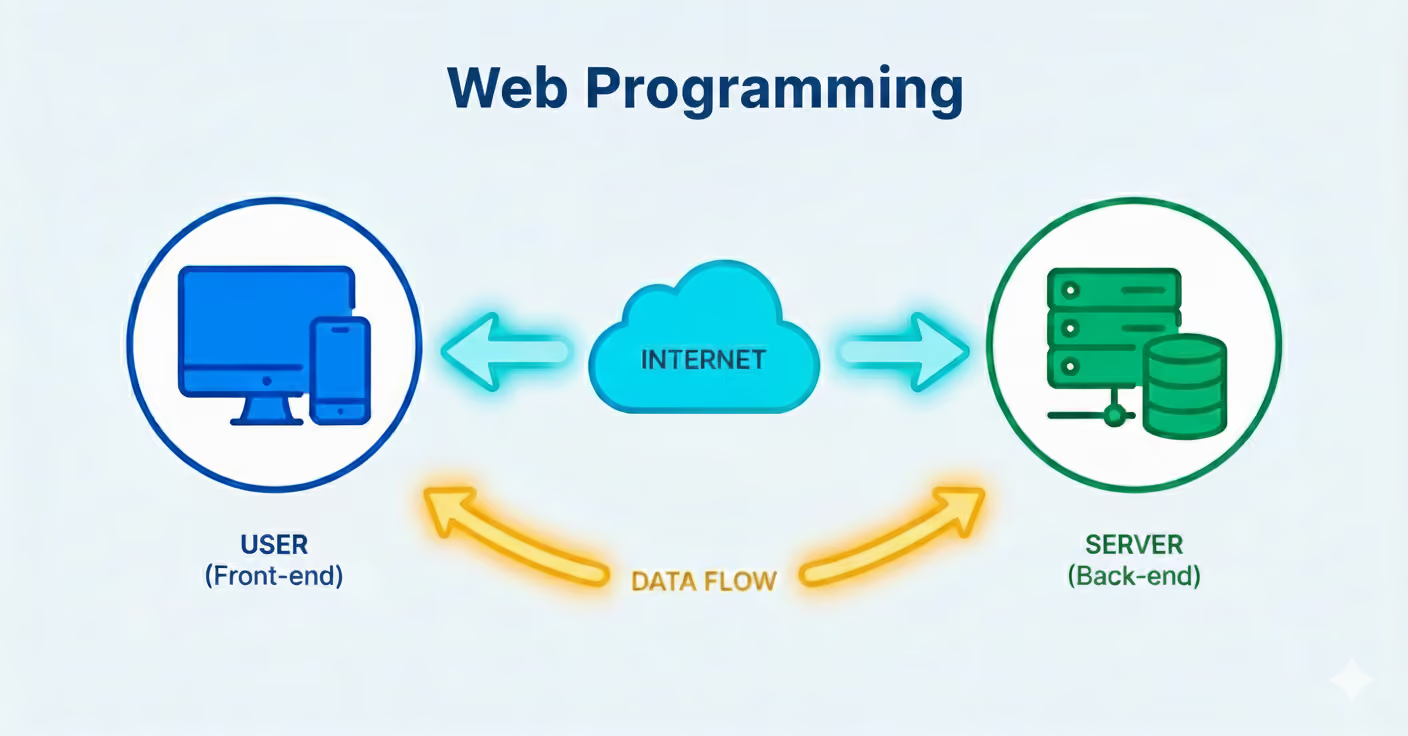
Web development is the process of creating websites or web applications that perform specific functions. These functions could be simple, such as keeping track of an individual’s daily water intake, or complex, like building applications that organize, edit, share, and store data for individuals and companies. Every project is designed to solve a problem for a chosen Target Audience (TA).
You can think of a web page as a digital product or service that facilitates and improves life for its users. When it comes to building web pages and applications, there are two aspects to keep in mind:
Front-End Development
This refers to the parts of the interface that are visible to your Target Audience, such as the main website, landing page, or mobile application. Front-end development includes visual design, information flow, placement of logos or branding, overall aesthetics, and graphics that contribute to the user’s experience as they navigate the page.
Back-End Development
This is the part of your website or application that stores and processes information based on user input. Back-end development forms the backbone of your web page, involving server-side programming to ensure smooth functionality. Troubleshooting and maintaining the system are key responsibilities of a back-end developer.
Both front-end and back-end development require foundational proficiency in programming languages such as Python, Java, HTML, or C#.
Benefits of Web Programming Projects
For high school students, coding through web projects is a great way to build a resume while showcasing problem-solving skills. Developing your own websites and applications exercises your ability to manage long-term projects, organize information, design effective user flows, and demonstrate programming proficiency.
If web programming feels intimidating, there are plenty of options to start learning at your own pace. A simple first step is to identify your target audience and ask what problems they might be facing. Even easier: choose yourself and your peers as the target audience. Think of web development as problem-solving in a digital context.
Here are some unique web programming project ideas for high school students to explore:
Essential Web Development Skills Every High School Student Should Explore
Before diving into web development project ideas, it’s important to understand the key skills that drive modern websites. Learning themes like front-end development, back-end development, responsive design, and mobile-first design ensures your projects are functional, user-friendly, and professional.
Key Web Development Concepts
Valuable Programming Languages and Markup to Practice
When you make a website, you use coding languages and markup languages to tell the computer what to do. Coding languages give your site instructions and make it interactive, while markup languages organize and structure the content so it displays correctly on the page.
Setting Up Your Development Environment and Tools
Before you start building websites, you need a few basic tools set up on your computer. This is called your “environment.” Your environment is just the place where you write your code, test your projects, and keep everything organized. Having the right tools makes coding easier, faster, and way more fun.
Key Tools to Set Up Your Environment
- Code editors (VS Code, Sublime Text, Atom): These are apps where you type your code, kind of like a superpowered Google Doc made for building websites.
- Version control systems (Git, GitHub, GitLab, Bitbucket): These help you save different versions of your projects so you never lose your work and can easily undo mistakes.
- Package managers (npm, Yarn): These tools help you quickly add ready-made code pieces to your project so you don’t have to build everything from scratch.
- Browser developer tools (Chrome DevTools, Firefox Developer Tools): Built into your browser, these let you peek behind the scenes of a webpage to see how it works and fix problems.
- Design and prototyping tools (Figma, Adobe XD, Canva): These apps let you draw or plan what your website will look like before you start coding it.
Get even more digital development motivation with this in-depth article on Graphic Design Project Ideas for High School Students.
10 Unique Web Development Project Ideas
1. Homework Hub
Organization is key, and the right tools can make all the difference. By developing a simple webpage designed to streamline homework assignments, instruction details, and due dates, a real-life need is met through technology. Help users manage their workload with to-do lists that let them visualize their accomplishments. Bonus points if you can add motivation elements to encourage students!
- Audience: Students
- Difficulty: Intermediate
2. Water Log
Need a hand with keeping track of your water intake? You can build an interesting and interactive one-page site that helps you do just that! It has fewer variables to account for, and you can have a larger target audience for this webpage. This particular web coding project can be a part of your weekend coding or after-school coding sessions. If you are short on time, you can even build wireframes with applications like Figma and Canva for this particular project.
- Audience: All
- Difficulty: Beginner
3. Pomodoro Technique Timer
An interesting way to facilitate study sessions with your own personal website is to build an interface that helps you count down the time, as explained in the Pomodoro technique. This technique is a time management method that guides students and working professionals in dividing their time into smaller work blocks and breaks. This allows tasks to be completed with sufficient focus at a steady pace. This is a beginner-friendly web programming project idea that can be personalized to your own preferences. Additional features could include user customization options!
- Audience: Students, Working Professionals
- Difficulty: Beginner
4. Progress Tracker
High school students have a lot to keep track of! Creating a web page designed to create a visual tracking experience allows students to conceptualize their academic progress, showing milestones like exams, vacations, and deadlines. Personalization opportunities can help students feel motivated and organized.
- Audience: Students
- Difficulty: Intermediate
5. Reading List Organizer
Build a simple webpage to host a year-long reading list. This is a fairly uncomplicated project idea to build through coding. This beginner-friendly project showcases coding skills while keeping variables minimal and manageable.
- Audience: All
- Difficulty: Beginner
6. Personal Brand Website
What better way to present your portfolio than through your very own website? Introduce yourself to admissions committees and potential employers with a webpage that showcases your interests and accomplishments in an elevated and impressive way!
- Audience: All
- Difficulty: Beginner
7. College Application Dashboard
Imagine an interface that can help you pick and choose your dream universities and collate all of the admissions information you will need in one place. This one’s a little complex, but it’s definitely a helpful tool for students who are in the process of applying to multiple Universities. Organize applications for multiple universities, compile admissions info, and generate to-do lists.
- Audience: College Applicants
- Difficulty: Advanced
8. Stretch App
A sedentary lifestyle is a leading cause of health issues for many individuals. Building an interface that can remind you to stand up, move around, or guide you through basic stretches throughout the day can prove to be a game-changer. Build an interface that reminds users to stretch or move throughout the day. Timers, notifications, and guided exercises make it practical for health-conscious users.
- Audience: All
- Difficulty: Beginner
9. Distraction-Free Focus App
Build an app to help users minimize phone distractions while studying. Personalize features to encourage focus, with gamification or tracking options. There are quite a few of these that can be found in the App Store on our phones, and many have proven to be effective. By working on a web development project like this, you get to take inspiration from existing apps and incorporate your own personal experiences. For instance, what are the things that would encourage you to stay off your phone while you study? With the help of a little market research, you can build an interface that’s unique to you and that will definitely stand out in your college application.
- Audience: Students
- Difficulty: Intermediate
10. Motivational Web Page
Everybody needs a little bit of positivity every day. Create a website to deliver daily motivational content. This project will help you share positivity with others. Its goal is to help you keep going with encouraging and gentle quotes. To take it up a notch, you can include a questionnaire in order to generate customized content for users. This makes the prompts that they’ll receive daily have an even greater impact on helping them achieve their personal goals.
- Audience: All
- Difficulty: Easy
If app design sparks your interest, dive even deeper by browsing through this detailed collection of App Development Project Ideas for High School Students.
Useful Tools for Web Development Projects
Building websites and apps is easier when you have the right tools to help you. If you like planning what your website will look like first, you can make simple “blueprints” called wireframes using sites like Figma or Canva.
Even though AI is growing, learning to code is still super important, as it lets you create innovative projects, solve problems, and build things that can really make a difference. Starting with small web projects helps you practice and get ready for bigger, even more exciting ideas later.
Essential Tools to Consider
- Code Editors & IDEs (like Visual Studio Code, Sublime Text, Atom): Special apps where you write your code and see it come to life
- Version Control & Collaboration (GitHub, GitLab, Bitbucket, Git): Allow you to save your work, track changes, and team up with others on projects
- Package Managers & Build Tools (npm, Yarn): Make it easy to add extra features or tools to your projects without starting from scratch
- Browser Developer Tools (Chrome DevTools, Firefox Developer Tools): Let you check your website, fix mistakes, and see how it looks in real-time
- Design & Wireframing (Figma, Adobe XD, Canva): Help you plan and draw what your website will look like before you start coding
More Innovative Computer Programming Projects for High School Students
For students who want to explore further, these project types provide a few examples and the skills they help build.
Beginner-Friendly Web Development Mini Project Ideas
Projects in this category are perfect for students just starting out. They focus on simple web pages, interactivity, and basic logic to build confidence and foundational skills.
- Mini Habit Tracker: Track daily habits or routines with simple front-end logic and interactive checkboxes.
- Color Picker Tool: Learn DOM manipulation and CSS styling with a small interactive tool.
- Basic Calculator: Practice JavaScript functions, arithmetic operations, and button event handling.
- Personal Recipe Page: Build a structured, interactive page to store and display recipes.
Front-End Development Project Ideas (HTML, CSS, JavaScript)
These projects emphasize styling, interactivity, and user experience using core front-end technologies.
- Interactive Quiz: Create a quiz with forms, conditional logic, and instant feedback.
- Weather App: Integrate APIs to display dynamic weather updates with a responsive design.
- Photo Gallery: Implement a grid layout with hover effects, lightbox, or carousel features.
- Animated Landing Page: Use CSS animations, transitions, and DOM manipulation for an engaging first impression.
Interactive Web Applications with Modern Frameworks (React, Vue, Angular)
Projects here introduce frameworks like React, Vue, or Angular to create dynamic and scalable web applications.
- Task Manager App: Multi-user task tracking with dynamic CRUD operations (distinguished from a simple homework tracker).
- Budget Tracker: Visualize personal finances with charts and a responsive UI using framework components.
- Chat Application: Real-time messaging with WebSocket integration or Firebase.
- Fitness Dashboard: Advanced interactive app with API integration, exercise tracking, and data visualization.
Database Integration and Backend Development Projects
These projects help students learn how to handle data, store it efficiently, and create applications with full-stack functionality.
- Student Grade Tracker: Full-stack application for tracking grades and assignments; includes authentication and CRUD functionality.
- Blog Platform: Node.js/Express or Python Flask backend with content management.
- Event Booking System: Manage bookings with user roles, database handling, and session management.
- Inventory Management Tool: Server-side logic, CRUD operations, and data visualization.
Mobile-First and Responsive Design Projects
This category teaches designing web applications that look great on any device, with responsive layouts and touch-friendly interfaces.
- Responsive Portfolio: Media queries, flexible grids, and mobile optimization.
- Restaurant Menu App: Interactive mobile-first design with adaptive layout.
- E-Commerce Product Page: Display products with responsive images, layouts, and call-to-action elements.
- Travel Planner: Interactive calendars, maps, and mobile-friendly navigation.
Creative Portfolio and Personal Branding Websites
These projects are ideal for students wanting to showcase themselves, their skills, or their work online.
- Photography Portfolio: Interactive galleries and animated transitions.
- Artist Portfolio: Custom styling and responsive content display.
- Resume Website: Downloadable resume, interactive sections, professional layout.
- Blog / Writer Page: Styled posts with user-friendly navigation and responsive design.
Real-World Business and E-Commerce Projects
Students learn how to build websites that solve real problems or help small businesses operate online.
- Online Store Mockup: Product listings, shopping cart, and front-end logic.
- Appointment Scheduler: Booking system with calendar integration and notifications.
- Restaurant Ordering System: Real-time order updates with a responsive interface.
- Small Business Landing Page: Marketing-focused design with clear calls-to-action.
Educational and Social Impact Projects
Projects in this section aim to solve societal problems, improve learning, or promote engagement with positive outcomes.
- Language Learning Quiz: Interactive quizzes with scoring and immediate feedback.
- Environmental Awareness Dashboard: Visualize data and promote sustainability awareness.
- Charity Donation Page: Secure forms, backend integration, and donation tracking.
- Peer Tutoring Platform: Scheduling, user profiles, and messaging for students.
Advanced Projects for Intermediate to Advanced Students
For students with solid web development experience, these projects push you to integrate front-end frameworks, back-end logic, databases, and third-party APIs into scalable, production-level applications. They strengthen problem-solving, debugging, and professional coding practices while adding impressive, portfolio-ready work to your resume.
- Social Media Dashboard: Full-stack application with authentication, data visualization, and API integration.
- E-Learning Platform: Manage courses, interactive content, and responsive front-end/back-end integration.
- Travel Booking Application: Multi-step forms, real-time availability, and payment integration.
- Collaborative Note-Taking App: Real-time collaboration with WebSocket/Firebase and user accounts.
For more digital design inspiration, check out this comprehensive blog featuring 36 Simple Animation Projects for High School Students.
Free Resources and Learning Platforms for Web Development
You don’t need expensive courses to learn web development. Many high-quality resources are available for free, helping you practice coding, understand new frameworks, and refine your skills. Utilizing these platforms allows students to explore web development at their own pace and gain knowledge comparable to formal classes. Video tutorials, interactive platforms, and community forums can all complement project-based learning.
Web Development Resources
Video Web Development Resources
Version Control, Testing, and Deployment Best Practices
Managing a web development project goes beyond writing code. Version control, testing, and deployment are essential skills that ensure your projects are organized, functional, and professional. Learning these practices early allows students to collaborate effectively, track changes, and catch errors before they affect users. By understanding how projects are deployed and maintained, you’re preparing for real-world development workflows.
- Version Control: Use Git and GitHub to track changes in your code, manage multiple versions, and collaborate with others.
- Testing: Test your website across multiple browsers and devices. Include functional, UI, and performance testing.
- Deployment: Host your projects using GitHub Pages, Netlify, or Vercel; configure domains, SSL, and mobile responsiveness.
Building Your GitHub Profile and Professional Portfolio
GitHub is like an online notebook where you keep all the code for your projects. It helps you save your work, share it with others, and show what you’ve built. People can see your projects, watch your progress, and even help you improve your code. It’s also a great way to show schools, friends, or future employers what you can do.
A well-organized profile demonstrates your technical abilities, commitment, and problem-solving skills. It’s a platform to showcase projects, track contributions, and share your coding journey with schools, peers, collaborators, and future employers. High school students can start simple and grow their profiles over time.
- Portfolio Best Practices: Add a README file to each project that explains what it does, how to use it, and shows pictures or screenshots so others can understand it easily.
- Professional Impression: Show that you’re active by starring projects you like, copying (forking) projects to experiment, and helping improve open-source projects.
- Linking to Applications: You can connect your GitHub to your personal website, LinkedIn, or college applications so people can see all your coding work in one place.
Assessment Criteria and Project Evaluation Methods
Evaluating web development projects is a key part of learning. By knowing what makes a project successful, students can design with clarity, prioritize features, and learn how to self-assess their work. Assessment can also help prepare students for future college projects, internships, and coding competitions. Structured evaluation ensures that the learning process is intentional and measurable.
- Functionality: Does the project meet its intended purpose?
- User Experience (UX/UI): Is the design intuitive, clear, and visually appealing?
- Code Quality: Is the code clean, maintainable, and documented?
- Responsiveness: Does the project work across devices and browsers?
- Creativity and Innovation: How unique or creative is the project idea?
Timeline Planning for Different Project Complexities
Project planning is crucial for managing your time and ensuring completion. Simple projects can be finished in a week, while complex applications may require multiple weeks. Planning timelines helps students prioritize tasks, set milestones, and avoid burnout. Understanding project scope early also teaches valuable skills in time management and project execution.
- Beginner Projects: 1–2 weeks
- Intermediate Projects: 2–4 weeks
- Advanced Projects: 4–6 weeks
Milestones: These are the big steps in your project, like drawing your plan (wireframes), building what people see (front-end coding), making the behind-the-scenes parts work (back-end integration), checking that everything works correctly (testing), and putting your project online for everyone to use (deployment).
Preparing for Coding Competitions and Hackathons
Competitions and hackathons are immersive ways to develop skills under pressure. They allow students to work collaboratively, solve problems quickly, and gain exposure to professional workflows. Participating in these events builds confidence and gives a glimpse into real-world development scenarios. Even simple projects can be adapted for these competitive environments.
- Skills Required: Rapid problem-solving, collaborative coding, and time management
- Preparation Tips: Practice algorithms, familiarize yourself with frameworks, and plan web programming project ideas in advance
- Benefits: Networking, professional exposure, potential awards or recognition
Programs, clubs, and competitions are an excellent way to grow your skill set and enhance your college applications. Take a look at these 8 Great Computer Science Extracurriculars for High Schoolers.
Leveraging Web Development Projects for College Applications
Web development projects are excellent tools to showcase technical skills and creativity on college applications. They provide tangible evidence of problem-solving, design thinking, and initiative. Highlighting real-world applications, challenges overcome, and outcomes achieved can strengthen applications to competitive programs. Documenting projects clearly allows admissions officers to understand your abilities and potential.
- Showcase Impact: Emphasize problem-solving and real-world applications
- Portfolio Presentation: Link GitHub, personal websites, or PDFs
- Narrative: Explain skills learned, challenges overcome, and results achieved
Looking Forward
Web development is about more than coding. It’s about creating solutions, improving experiences, and expressing creativity. High school students who engage in projects not only build technical proficiency but also learn time management, collaboration, and design thinking. Whether starting with beginner-friendly projects or more advanced applications, every project builds a foundation for future academic and professional opportunities. By leveraging these web programming project ideas and best practices, students can make meaningful progress in both skills and portfolio development.
So, pick a project today and remember, every line of code you write brings you one step closer to becoming a confident, capable developer!
If you’re a high school student ready to channel your potential in web programming, Indigo Research’s 1:1 Research Programs give you the chance to go further. You’ll collaborate with mentors from top universities on projects exploring web development, interactive applications, or digital innovation. Join us to turn your coding skills into meaningful research that demonstrates both technical talent and academic curiosity.





.jpeg)